
The following codes are Microsoft Windows error codes that we can encounter when performing Windows Updates via our Update Baseline feature or the Deployment options in the EndPoint Manager. A with all Microsoft-related errors, usually a restart and a retry solve the issues. Contact our team is issues persists.
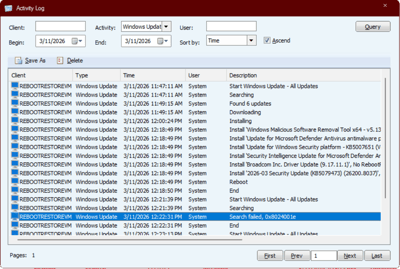
Error code 0x80070005
This error code means "Access Denied". It occurs when your user account or the system lacks the correct file, folder, or registry permissions needed to install the update files.
Source: Troubleshoot Windows Update error 0x80070005
Error code 0x800704c7
Error code 0x800704c7 is a Windows update and installation error that generally translates to "The operation was canceled by the user". It indicates that an update, installation, or system process was interrupted or aborted, often due to file corruption, conflicting software, or premature termination of the task. It often appears during automated processes (Windows Update, OneDrive installation, or winget).
Source: Explanation of Error Code 0x800704c7
Error code 0x8024001E
Error code 0x8024001E indicates a Windows Update failure, often occurring because required files are corrupted, incomplete, or the service was interrupted during installation. It is frequently resolved by restarting the Windows and trying the Windows Updates again.
Source: Windows failed to install the following update with error 0x8024001E
Error code 0x80004005
Windows error 0x80004005 frequently appears during the update process when system files are corrupted or an active update is interrupted. This issue typically prevents new updates from installing or causes the Windows Update service to stop functioning properly.
Error code 0x8007041d
Error code 0x8007041d (ERROR_SERVICE_REQUEST_TIMEOUT) indicates that a Windows service, typically Windows Update for our use case, failed to respond to a request in a timely manner, often due to corrupt system files, improper service configuration, or network issues. It commonly stops updates or app downloads.
Error code 0x80070005
Occurs when the update process cannot access necessary files or folders due to permission issues. It provides troubleshooting steps for resolving this error on Windows client, Windows Server, and Azure Virtual Machines.